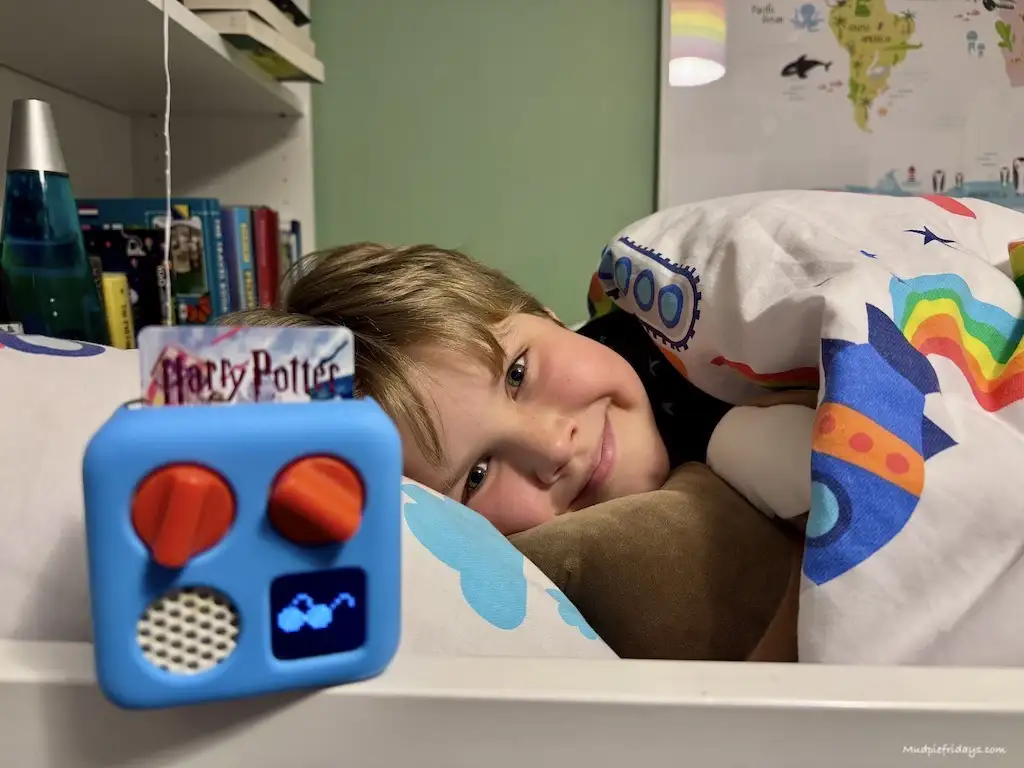

If you are regular readers of Mudpie Fridays you will know that we love our Yoto Mini and new 3rd Generation Yoto Player. Harry uses our Yoto Player every day and the Yoto Mini comes on all sorts of adventures and long journeys with us. So when I heard about a new concept they were launching called Yoto Space. I was interested to see how it would enhance our Yoto experience and our Yoto library. After all, I love it because it is screen-free, the fact that Harry is learning all the time without knowing and the sheer volume of choice when it comes to Yoto cards. Would Yoto Space mean that it is no longer screen-free find out in this Yoto Space review.
AD – This is a collaborative post and includes an affiliate link denoted by * should you make a purchase I will receive a small commission.
What is a Yoto Player?
The Yoto Player* is a physical device that is used to access audio content. It is designed to be simple and intuitive to use, with a large knob that children can use to navigate through their audio content. The Player is also equipped with a speaker and a headphone jack, allowing children to listen to their content in a variety of settings.
Yoto Cards are physical cards that are used to unlock the content. Each card is designed to be visually engaging and features a unique character or theme. When a child places a Yoto Card in the Yoto Player, the corresponding audio content is played. The range of audio content available is huge with suitable titles for young children ages 4 to 7-year-olds. Including Yoto Disney and Yoto Space Adventure plus they have a Yoto Club*. There are also lots of Yoto cards for tweens up to the age of 12. As well as fiction, there are Educational Yoto Cards, recipes, music, radio and podcasts. There is something for everyone. Harry loves getting lost in an immersive audio adventure story and particularly enjoys the ladybird audio adventures.

What is Yoto Space – a Review?
Overview of Yoto Space
Although Yoto in its very basic form a Bluetooth speaker, a Yoto speaker with audio functionality is aimed very much at children’s imaginations. Yoto Space is designed for grownups. So no worries about increasing the children’s screen time. Phew. Instead, it allows us parents to ask questions to other Yoto player owners and see tips & tricks for getting the most out of Yoto. There is also a whole bunch of extra audio content and incredible audio recordings that you can add to your Yoto library for free.
Yoto Space is divided into three different areas. Covering audio collections, make your own and community. There is a menu on the left-hand side with little Yoto icons. The menu is easy to navigate and takes you through all three areas one small step at a time and most importantly how to get free Yoto cards for your Yoto library.
How to Use Yoto Space
Getting Started with Yoto Space
To use Yoto Space you need to login. This can be done on your browser or if you are on your phone via the app. You should have already downloaded the Yoto App to use with your original yoto player and created an account. By logging in you will also be able to leave reactions and comments. When you first visit Yoto Space you should see a ‘start here’ article which will give you information all you need to get started. It is also a good place to ask questions if you get stuck as other members of the community will have you navigate to where you want to be.


Audio Collections
This is where you can access free audio and free Yoto Cards for your kids.
Yoto Studio
Here you can discover exclusive digital cards made by Yoto. You can then add to your yoto library in the app and then either copy to a blank Yoto card or play directly from the app. Over time this area will grow and expand. At the moment you can find a place to add your child’s birthday to the shout-outs for daily birthdays which I think is a nice touch. Along with a timer to get ready to use the house. I love this! And it really does help get Harry out of the door with less stress in the mornings. There is also daily learning and games. And a favourite of Harry’s – fart sounds! Such a fun sound! We have not tried the Beatbox audio although it is next on the list and there are other more soothing musical experience s.
In the “Explore” section, children can learn about science, history, and geography through interactive stories. The “Adventure” section offers exciting stories and games that allow children to use their imagination and problem-solving skills. The “Imagination” section offers creative and imaginative stories that encourage children to think outside the box.
Users can also create their own playlists by selecting their favourite stories and music.
Made by You – MYO Cards
One of the most exciting things in the Yoto Space community is the chance to share Yoto cards that you make yourself. As well as listening to others that have been made. A great place to showcase your own audio content, such as stories, songs, and soundscapes, using the Yoto app and hardware. What is created is free to download to all community members into their Yoto library. A great way to get free Yoto cards.

Public Domain
Here there is a lot of audio content that has been shared. You can add these to your own Yoto library although Yoto does recommend adult supervision and that you listen to them first. This is to ensure they are suitable for your family and personal tastes. As Yoto does not control the content in this section. There is the opportunity to leave feedback which you can do once you have listened to or read other people’s. You can even share your own content here in a really easy and simple way. Another great way to get some free Yoto Cards for your Yoto library.
Podcasts
This area operates in the same way as the above, again listen first as the content may contain ads. I like how the podcasts are filtered into different topics such as bedtime, fairytales, adventure and many more. As the platform grows this will be important to help you find what you are looking for.
Radio
Lots of choices here again for radio. All you do is select the channel that you are interested in and add it to your library. Down the right-hand side of the screen, you can see what was last played and so what is popular with other families. There is a search function if you are looking for something in particular, and also a tab which is labelled popular. Here I found many more children’s radio stations.

Make Your Own
Another way that Yoto Space supports its community is by allowing users to create their own cards. Cards are physical objects that can be inserted into the Yoto player to play specific audio content. Users can create their own free Yoto cards by recording their own audio or uploading existing audio files.
Making your own cards is a fun and creative way to personalise your Yoto experience. Users can create cards for their favourite songs, stories, or even their own original content. It’s also a great way to share your creations with other members of the Yoto community. Perhaps you are the next world-class talent?
In my opinion, this is a brilliant area of Yoto Space if you want to get involved in making your own Yoto cards as it gives you all the help you need to create your audio files. Although Yoto Space is predominately intended for adults I can see Charlie using this area a lot. Since he has a real interest in creating his content.
Tutorials
How-to guides for getting started with Make Your Own cards as well as more advanced tips for those wanting to make their own audio from scratch. Plus, there is the option to upload self-made Make Your Own tutorials. It is nice to see that some of the tutorials are in video format which I find can be more effective when trying something for the first time. There really is something for everyone here from creating a recipe card to graphics to high-fidelity field recordings and compelling original audio. The sky’s the limit. You also can add your own articles, expanding that sense of community further.
Building Blocks
If you are new to creating your own Yoto cards then it can feel quite a giant leap into the unknown. So this is the place to head to once you have listened and watched the tutorials. As you can find scripts, themed sound packs, musical effects and pixel art. There are so many resources available. The best part is that it is all free to download. Plus other community members can add articles.

Yoto Space Community
Yoto Space is not just a place to listen to stories or music. It also has a vibrant community of users who are passionate about creating and sharing their own content. Here are some of the different ways that Yoto Space encourages and supports its community.
Card Chat
When you are looking at new cards to buy sometimes it is nice to have a recommendation. The Card Chat area is designed for exactly this, here you will find community and Yoto team recommendations and reviews on the cards that are great for your family. Especially useful if you are considering some of the original series which are not based on classic novels you may know elsewhere.
Tips & Tricks
Another great area where the members of the community can share their life hacks using their Yoto Player! These are great ideas to make your life easier as a parent. There is the opportunity to rate them too. Includes ideas for screen protectors, setting alarms, storage ideas and much more.
Questions
Ask a question or answer to commonly asked questions. I really like that this has community involvement so they aren’t just dry support articles. Although there is a link to technical support as well if needed. When you visit Yoto Space you will see a little box with a number in it next to questions. Showing how many new questions have been asked since you last visited.
Ideas Wall
One of my favourite things about Yoto (can you tell that we love it) is that they are constantly looking to try and improve. The ideas wall is a place to hear all of the community’s ideas, whether it’s a new feature or a whole new product. It is a great way to be able to input into the continuing development of the product and if you have ideas for special stories.
Yoto Daily
This is a mini-daily podcast that you can listen to for free on your Yoto Player. This area of the website allows you to input into what 5 things you would like Jake, the podcast host to talk about. You can also upload your creations from the draw-along sessions and download colouring pages. As well as being able to access the day’s podcast you also have access to a back catalogue of 100 episodes to add to your Yoto library.
Yoto Space Review – My Conclusions
Overall, the Yoto Space community is a vibrant and supportive group of users who are passionate about creating and sharing their own audio content. Whether you’re making your own cards or engaging in the community in other ways. There are plenty of opportunities to connect with other users and express your creativity. Considering this is a free resource being offered to all Yoto Player owners I think it is a great addition, to an already brilliant audio player. It will be fun watching the community expand and grow. I hope you have enjoyed this Yoto Space Review.
If you are a Yoto Player* owner make sure you become part of Yoto Space.
If you are new to Yoto then you will be pleased to hear that we have a discount code to use at Yoto in store on the website. Yoto never offers a discount on the Player Yoto Mini so even if a Yoto Sale is on then this is a good buy. It is also avaliable worldwide including Yoto USA. To get the Yoto discount code you can use this referral link * 5% off Yoto Mini or Yoto Player Discount Code*. The Yoto promo code can be used on a new Yoto player or a Yoto mini players. Just add them to your shopping cart on the Yoto website and use the Yoto coupon code AFF-MUDPIE5 on the first screen before going through the checkout process from the card store. They make a great idea for travelling families and a lovely gift.

If you’ve liked this post please follow me on my social media channels:
Mudpie Fridays: Twitter | Instagram | Facebook | Pinterest |LinkedIn
PIN for later – Yoto Space Review & How to get free Yoto Cards for your Yoto library